Slides in. Narrated video out. Turn a PowerPoint into a polished, narrated presentation video - written, voiced, designed and scored on your own PC.
Bring in a PowerPoint, a PDF, pictures or a typed outline. Deckora keeps your slides' own design and builds each one up as the narrator mentions each part, or its offline AI lays every slide out again in a calm, modern design - using only the slide's own words and pictures. A natural voice reads the script you write, or the one the AI writes for you; music composed for the video's exact length dips under the voice; and you get an MP4 ready for YouTube, Teams, LinkedIn or the boardroom screen, plus an editable PowerPoint of the new design. Nothing is uploaded - it all runs on your PC.
A made-up company's quarterly review, typed as a five-slide outline and given a voice, music and sound by Deckora - nothing touched up.
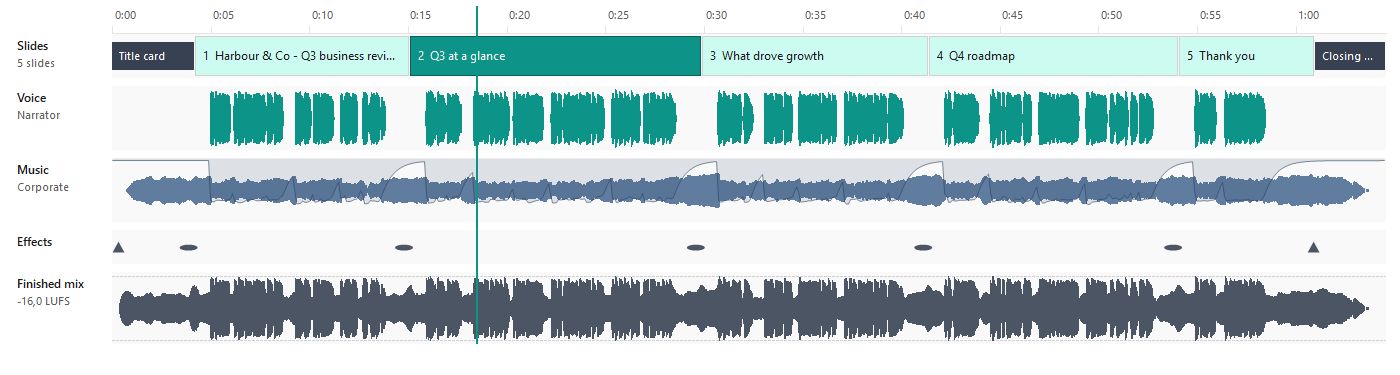
The Sound timeline: the whole soundtrack on the video's clock - the slides and cards, the voice, the music dipping under it, the effects and the finished mix - played from any point before the video is built.
PowerPoint (text, pictures, speaker notes and the videos on its slides), PDF pages, pictures with OCR, and Markdown or plain-text outlines. Your PowerPoint's own design is kept.
Five female and five male narrators, British and American, with natural pronunciation (acronyms as words, your organisation's names said right) and a listening check that hears every slide back.
Write the voice-over yourself, import a script, use your speaker notes - or let the built-in AI write it, in the tone, length and audience you choose. It covers every point in order, drops any figure or name your slides don't use, and can follow your organisation's example narrations. It runs on your PC; nothing is sent anywhere.
The offline AI reads each slide and lays it out again in a calm, modern design: cards, key figures, roadmaps, steps, tables and charts redrawn from their own data, people with their names, and pictures cut cleanly from their background - each part arriving as it's spoken. Pick a slide's layout yourself and Deckora learns your choice.
The camera glides in on each part as it's mentioned, the rest softly out of focus, with an opening title card, section cards and a closing card - a filmed look, not a slideshow.
Thirty-one compositions restyle the whole deck; your company template's logo, colours, header and footer are read straight from a .potx or .pptx, with brand lock for the whole organisation.
Royalty-free music composed for the video's exact length, or a track from the music packs played by real instruments - hear the previews. It dips under the narrator, with soft sound effects and the whole mix set to -16 LUFS. See and hear it all on the Sound timeline.
For the executives who want uniform slides: the redesign saved as a PowerPoint of real shapes - text boxes, cards, step circles, figure tiles and tables in your colours - with the voice-over in the speaker notes.
MP4 up to 4K at 60 fps - widescreen, square or vertical, or all three in one go; captions in four styles; a badge, a watermark and the presenter's name; a target length met by pace and pauses.

The Essentials pack: ten pieces for business presentations - bright, corporate, reflective, cinematic, technology, ambient and serious - played by recorded piano, strings, harp, mallets, guitar, woodwinds and horn. Included in the subscription; packs stay encrypted on your PC and play while Deckora is licensed.
Hear the previewsTry every feature free for 14 days, then subscribe. Prices are in Rand, with the US dollar equivalent as a guide; checkout is PayFast's secure payment page.
Pay a month at a time, cancel whenever you like
Each licence is for one PC. Need Deckora for a team, or a demo with your own slides first? Talk to us.
The full installer: every voice and AI model inside, so nothing downloads after it. It's about 12 GB, in parts that go together in one folder.
MD5 d4a8768bcf46eb853053a3b0e2b38fdestart hereDeckora asks for a licence key before you carry on. Your presentations and videos stay on your PC, untouched - everything picks up where you left it the moment you add a key.
The voices and the AI models that write and lay out your slides run on your own PC, so they come with Deckora - about 11 GB of the 12. That's what keeps your slides private, and why nothing downloads later.
One file that size is awkward to download and to host. Put every part in the same folder and run the .exe; if a part is missing, setup says which one.
No. Your slides, the voice-overs and the videos are made on your PC. Deckora only goes online to check its licence and, if you choose, to fetch a music pack.
Sign in to your StreamSoft account and choose Cancel subscription on the order. Deckora stays fully on until the month you've paid for ends, and you won't be charged again.
One. Moving to a new PC? Deactivate it under Help › Licensing on the old one, or ask us and we'll free the licence up. For a team, get in touch.
Checkout is PayFast's secure page, so we never see your card details. We email your licence key once the payment has gone through.
Fourteen days free with everything on - then R399 a month, everything included.
Start your free trial